
How Touch Typing Drastically Boosts Your Daily Productivity
Touch typing is the cognitive ability to type without looking at the keyboard. By training muscle memory in each of your ten fingers, you bridge the gap between human thought and digital execution. Most computer users type between 35 and 45 Words Per Minute (WPM) using the hunt-and-peck technique. With TypingTeacher's systematic muscle-memory training, users routinely double their speed to 75–90+ WPM, saving an estimated 21 working days per year in typing time.
The Anchor Keys
The small physical tactile bumps on the F and J keys are your navigation anchors. Return your index fingers to these keys instinctively to orient your hands without glancing down.
Surgical Accuracy First
Speed is a natural byproduct of accuracy. Strive for 96%+ accuracy before accelerating. Fixing mistakes takes four times longer than typing with deliberate rhythm.
Ergonomic Posture
Keep your wrists slightly elevated above your keyboard, elbows at 90-degree angles, and shoulders relaxed to prevent strain and repetitive stress injuries (RSI).
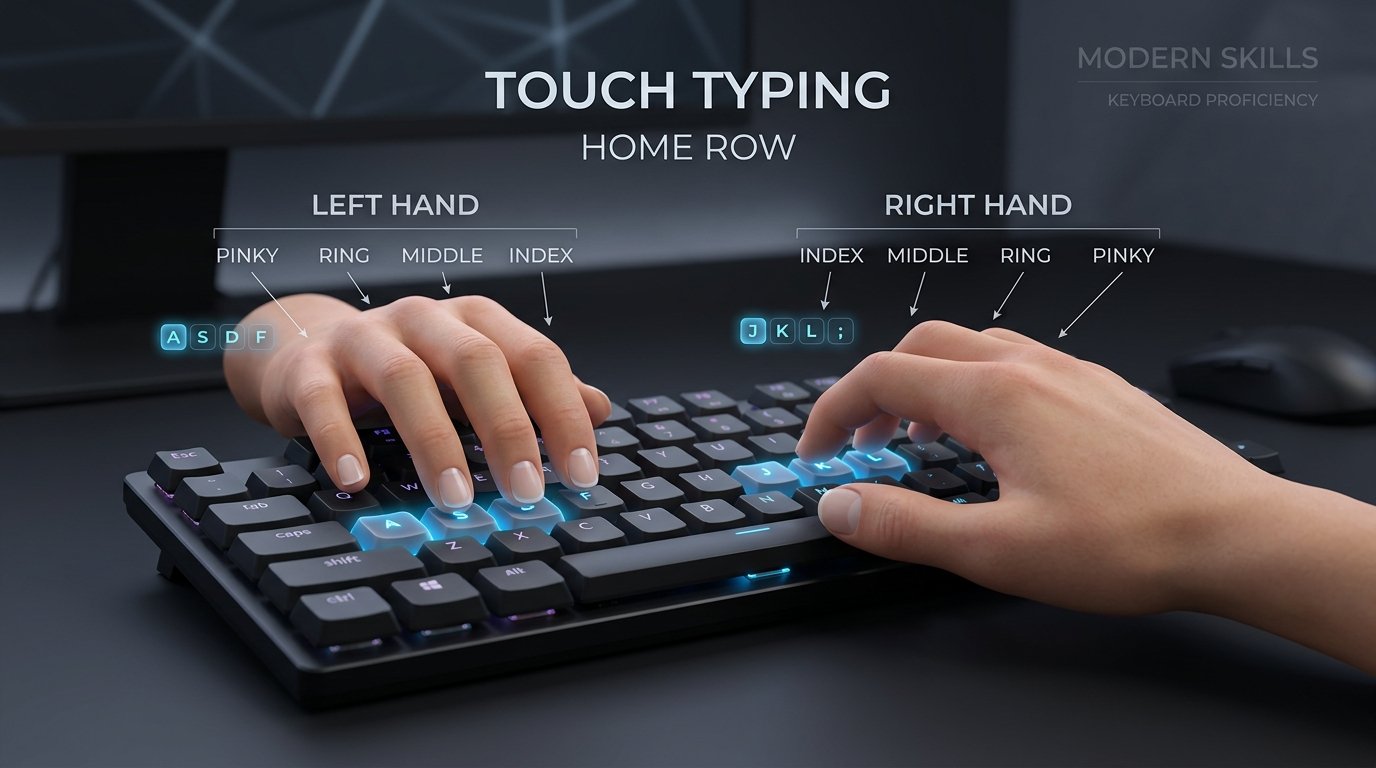
Anatomical Home Row Finger Placement
Touch typing relies on tactile spatial anchors. Position your index fingers on the physical ridges of the F and J keys, allowing your remaining fingers to align automatically on the home row (ASDF and JKL;).
Official Touch Typing Speed Benchmarks
| Speed Category | Words Per Minute (WPM) | Accuracy Target | Industry Equivalency |
|---|---|---|---|
| Beginner | 10 – 30 WPM | 85% – 90% | Casual hunt-and-peck typist |
| Intermediate | 35 – 50 WPM | 92% – 95% | Average administrative standard |
| Professional | 55 – 75 WPM | 96% – 98% | Software engineers, writers, executive assistants |
| Master Typist | 80 – 120+ WPM | 98% – 100% | Court reporters, competitive speed typists, top 1% |
Frequently Asked Questions
How does TypingTeacher calculate Net WPM? ▼
Standard touch typing calculation defines 1 word as 5 keystrokes (including spaces and punctuation). Gross WPM is calculated as (Total Keystrokes / 5) / Elapsed Minutes. Net WPM subtracts an error penalty: Gross WPM - (Uncorrected Errors / Elapsed Minutes).
Can I get an accredited Certificate of Completion? ▼
Yes! Once you advance through any of our 3 structured courses (Beginner, Professional, or Expert) or challenge the exam directly, you can take the verified 2-minute examination test. Maintaining >40 WPM with >90% accuracy generates an official digital diploma with verification ID, digital seal, and admin validation pipeline.
Are keyboard sound effects customizable? ▼
Yes. TypingTeacher features a zero-dependency procedural Web Audio API engine offering Mechanical Cherry MX Blue clicks, deep linear Thock, vintage Typewriter, and Mute options with zero audio lag.